How to Use Vlookup in Excel with Two Sheets
Understanding Vlookup Syntax
Microsoft Excel is a powerful tool for data analysis and manipulation. One of its most useful functions is Vlookup, which allows you to retrieve data from another table or sheet based on a specific value. In this article, we will show you how to use Vlookup in Excel with two sheets. This can be particularly useful when you need to combine data from multiple sources or when you need to look up data in a large dataset.
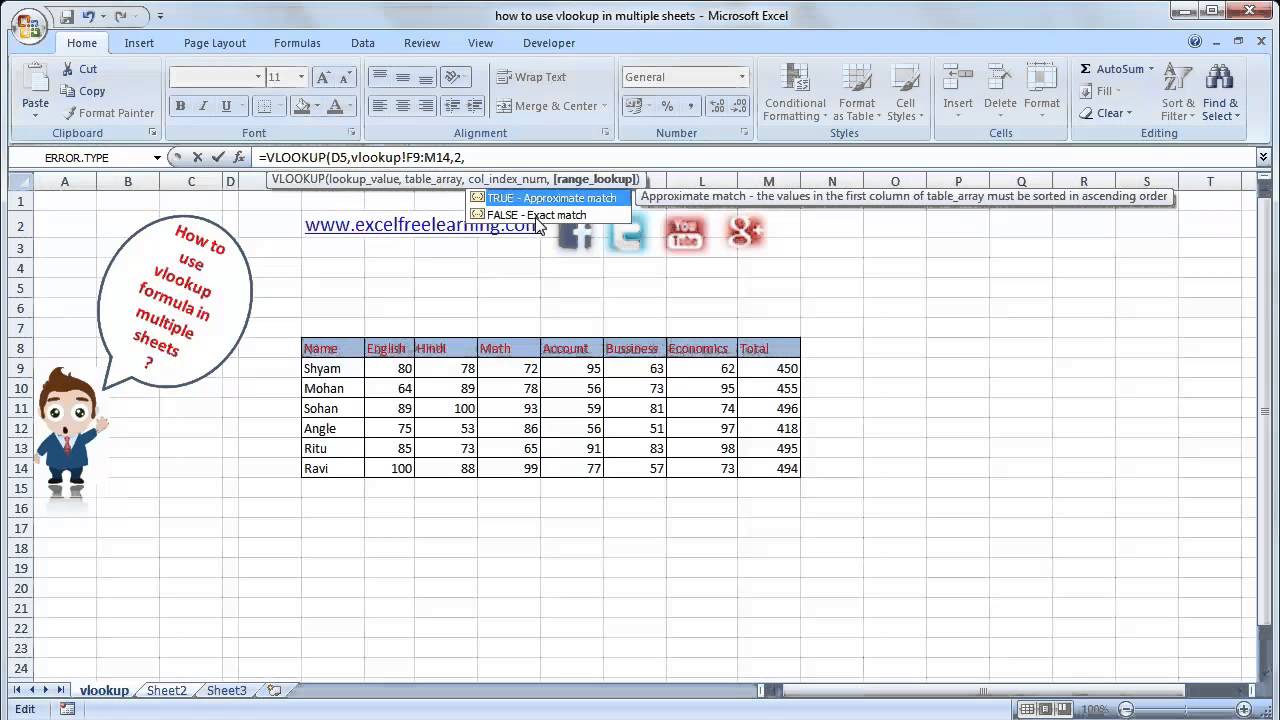
The Vlookup function is used to look up a value in a table and return a corresponding value from another column. The syntax for Vlookup is VLOOKUP(lookup_value, table_array, col_index_num, [range_lookup]). The lookup_value is the value you want to look up, the table_array is the range of cells that contains the data you want to retrieve, the col_index_num is the column number that contains the data you want to retrieve, and the [range_lookup] is an optional argument that specifies whether you want an exact match or an approximate match.
Using Vlookup with Two Sheets
Understanding Vlookup Syntax: Before you can use Vlookup with two sheets, you need to understand the syntax of the function. The lookup_value can be a cell reference, a text string, or a number. The table_array can be a range of cells on the same sheet or on a different sheet. The col_index_num is the column number that contains the data you want to retrieve, starting from 1. For example, if you want to retrieve data from the second column, you would use 2 as the col_index_num.
Using Vlookup with Two Sheets: Now that you understand the syntax of Vlookup, you can use it to retrieve data from another sheet. Suppose you have two sheets, Sheet1 and Sheet2, and you want to retrieve data from Sheet2 based on a value in Sheet1. You can use the Vlookup function like this: VLOOKUP(A2, Sheet2!A:B, 2, FALSE). This formula looks up the value in cell A2 on Sheet1, and returns the corresponding value from column B on Sheet2. You can adjust the formula to suit your needs, and use it to retrieve data from any column on the second sheet.